
How can I get a domain name?
August 12, 2016Can I get email attached to my domain name?
August 12, 2016How can I find out where my domain name is registered?
If you have a domain name already, but have no clue how to log in to the company that you registered that domain name with, you can figure out that information fairly easily.
First, go to https://www.whois.net and type in your domain name. For example, we would type in thed3.com if we were trying to find our domain name registrar. After you hit return, you’ll see some information at the top that identifies your registrar. On the following screen shot, you’ll notice our registrar is Enom.
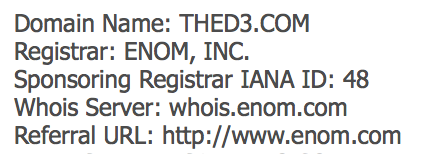
Second, with your registrar company name in hand, you can either Google the registrar business name or use the Referral URL if there is one listed. In the above example, we would go to http://www.enom.com. At the top of most domain registrar businesses, there will be a Login link titled “Login” or “My Account” or something similar. Click on that link. From there, you can click on Forgot Login? or Forgot Password? and you’ll receive instructions on retrieving that information. If that doesn’t work for you, you can call customer service for the registrar and explain that you’ve lost your login information and let them know your domain name. They’ll be happy to help you retrieve that information. Once you have a username and password for your domain registrar, keep that information safe so you can retrieve it easily and securely. It’s important information to maintain.
